Automate content development with a workflow template
You can build workflows that guide the hand-off from one task to the next in a project. Inspire provides you with a Topic template that includes the basic Activities of developing content, getting it reviewed and approved, and publishing a deliverable.
 Required permissions
You must have permission to the Projects Module to work with projects and workflows.
 However, keep in mind that administrators and other users can set permissions on components and folders.
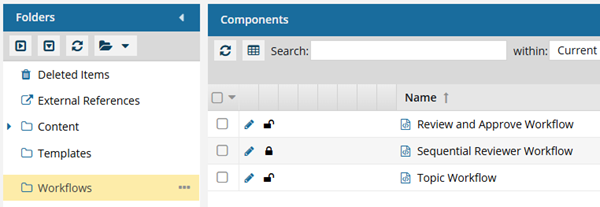
- You must have permission to edit the workflow template component.
- You must have folder permissions where the template is stored.
- For details on how to check and set permissions, refer to: Set permissions
 For a complete list of permissions, including starting a workflow from a template, read: Workflow permissions.

In the Topic template that Inspire provides, the following process is already designed for you.
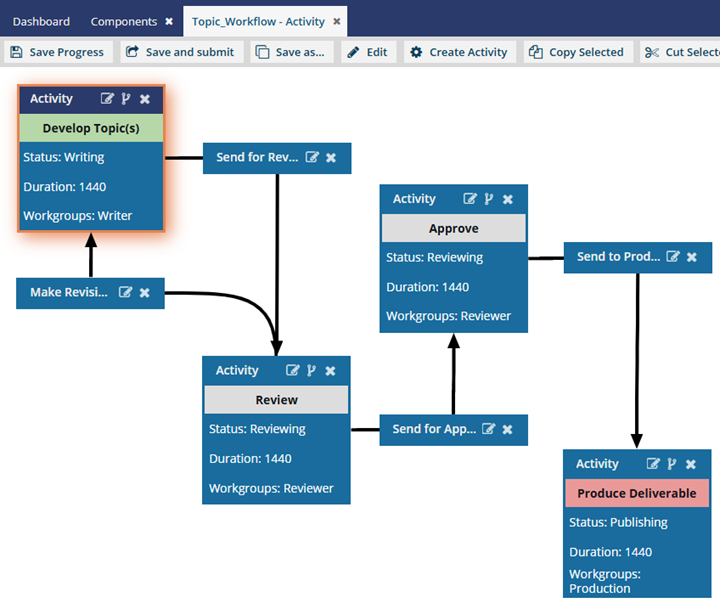
- You need to configure some of the Activity settings, such Project Activity and Duration.
- The sample Topic template Inspire provides does not contain any Workgroups. You can add collections of users that you want to complete specific Activities in the workflow.
 You can create an entirely new workflow template component that has no default Activities and Transitions.
- Use the Topic workflow template explained in this topic as an example of what you can create.
- To create a new template, follow the steps in: Create a workflow template component.
What do you want to do?
- Learn more about Inspire's content development workflow in: Understand the topic workflow.
- Customize the Topic template to configure Activity and Workgroup settings in: Customize the topic workflow template.
- Add an automated Action to a topic workflow template. Currently, there is a limited list of automated Actions that can be performed by Inspire:
InspireCreateReview (Add a Create Review Action to a topic workflow template)
InspireCreateApproval (Add a Create Approval Action to a topic workflow template)
- InspireApprove (Add an Inspire Approve Action to a topic workflow template)
- InspireUnapprove (Automate unapprovals in a workflow)
- InspireCreateTranslation (Automate translation in a workflow template)
- InspirePublish (Automate publication in a workflow template)
- InspireCompletenessReport (Automate completeness reporting in a workflow template)
- InspireTranslationCompletenessReport (Automate translation completeness reporting in a workflow template)
- Start an active workflow based on a template: Start a topic workflow from an existing project.
- Create your own topic workflow. Follow the steps in: Create your own workflow template.