Create workflows to automate a process
You can build workflows that guide the hand-off from one task to the next in a project.
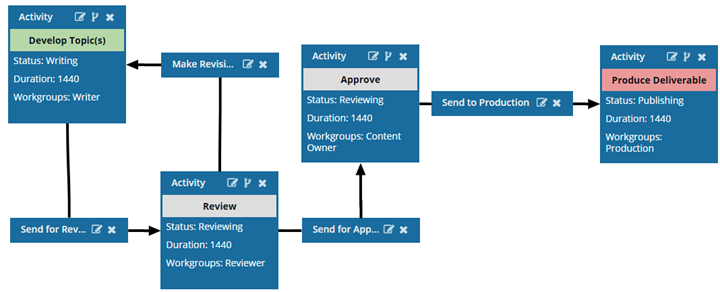
- Workflows can reduce the need for manual intervention and make operations more efficient.
- Inspire workflows are based on if/then logic, where Inspire performs a specific action when a certain condition is met.

In Inspire, workflows follow this process:
- Configure Templates. You can use the sample templates provided in the Workflows folder or create your own. Inspire provides a workflow editor to configure the flow of tasks.
- Start a workflow that uses a specific template. You can start a workflow from a project, a project assignment, or the Components browser. You must assign the first task in the workflow, and as users mark their tasks as Complete, the workflow advances.
- Manage and monitor workflows. You can see the status of a workflow and the individual assignments. You can see the status as details in a grid or as a diagram.
 Before you begin
- Required permissions
- Understand workflows
- Understand workflow notes and statuses
- Prepare to create a workflow
 To get started: