Manage the Event log module
As an Inspire administrator, you can manage access to the Event log as a module.
 Tips and tricks
- The Event log option is no longer listed in the
 Administration menu.
 - It now has its own top menu option called
 Event log.
 - It's listed after
 Notifications option and before
  Publishing.
 - This allows users who aren't administrators access to event logs for troubleshooting.
To manage the event log:
- By default, users who have the role of System Administrator or Application Administrator have access to the Event log menu.
- You can grant users who aren't admins permission to the Event logs module. Follow the steps in Update module access permissions.
- You can still review and manage the logs using the Event log menu. Read Troubleshoot using event logs.

To update module access permissions for the Event log:
-
From the
 Security menu, select Module access management.
-
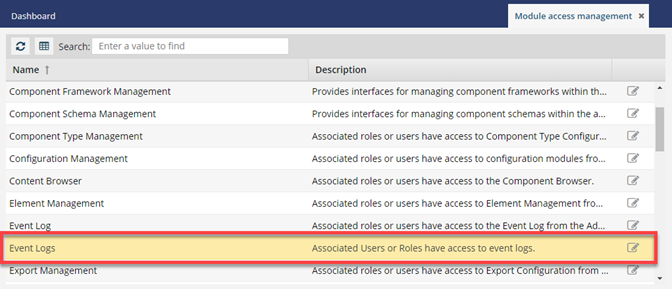
From the Module access management tab, select the Event logs and click Update
 .
.
-
To update user or role module access, complete the following sub-steps.
-
Select a user or role.
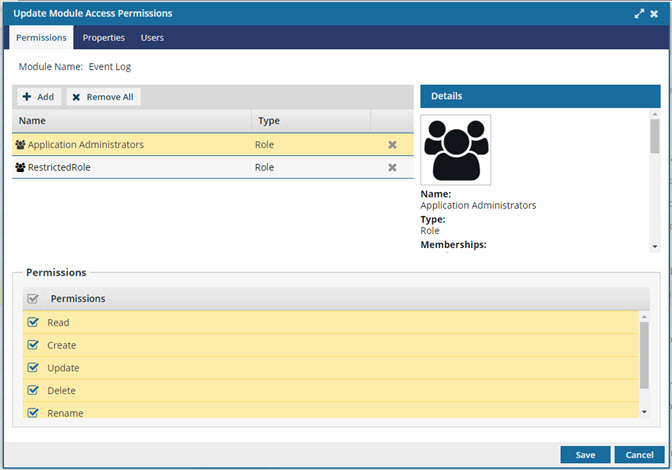
 You can review the Details for the user or role in the new panel on the right. You can see information such as Name, Type, and Memberships for the user or role that has access to the module.
 -
To add users or roles, select
 Add.
Add.
-
In the Select Users/Roles dialog, select the checkbox next to the name of each user or role to add to the module.
On the Select Users dialog, if the list is large, or you only want to see a certain type of user, you can narrow the list in the following ways:

- To see only names that contain a word or specific letters, in Filter, enter text. For example, you can find names that contain "admin", or "review". You can't search for text in any other column except Name.
- To see all users sorted by Name, Security Type, or User Type, click the column heading and then click the gray arrow. To sort by Name or User Type, you can also use the Sort By drop-down box.
- By default, names with a User Type of Support are not included in the list. To see these users, select the Include support users option.
-
To remove user or role access to a module, select a user or role and then click
 Remove.
-
Select a user or role.
-
To set user or role permissions for a module, complete the following sub-steps.
-
Select a user or role, then select the checkbox next to one or more permissions to set those permissions for the selected user or role.
The Read permission is selected by default and cannot be removed.
-
Select a user or role, then select the checkbox next to one or more permissions to set those permissions for the selected user or role.
- Currently, there are no module-specific actions that you can grant permissions to on the Properties tab for the Event Log.
- To set the permissions, click Save.