Manage optional features
Inspire provides some features that you can choose to use or not. Most of these features are not enabled by default.

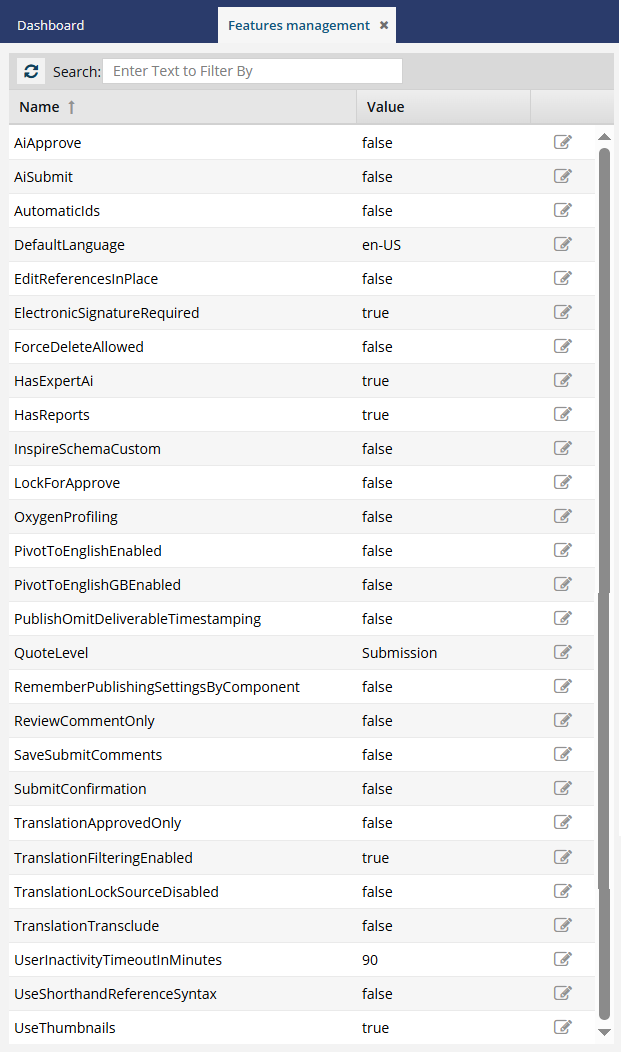
Administration features:
Component features:
- AutomaticIDs
- DefaultLanguage
- ElectronicSignatureRequired
- ForceDeleteAllowed
- LockForApprove
- OxygenProfiling
- RememberPublishingSettingsByComponent
- SaveSubmitComments
- SubmitConfirmation
- UseShorthandReferenceSyntax
- UseThumbnails
Translation features:
- DeleteTargetsAfterCancel
- PivotToEnglishEnabled
- PivotToEnglishGBEnabled
- QuoteLevel
- TranslationApprovedOnly
- TranslationFilteringEnabled
- TranslationLockSourceDisabled
Review features:
Publishing features:
- PublishOmitDeliverableTimestamping
- PublishApprovedOnly
Third-party software integration:
- HasExpertAi
- InspireSchemaCustom (Oxygen integration)
- EditReferencesInPlace (Oxygen integration)
AiApprove
 To use the premium AI features, you must purchase it separately. Contact your Vasont customer representative to invest in efficiency and discover how AI can elevate your search experience today!
Enabling the AiApprove feature allows you to create an Approve index to build up the content available in a chatbot you provide to your customers. After you enable the feature, you can then create the actual index in AI configuration management.

AiSubmit
To use the premium AI features, you must purchase it separately. Contact your Vasont customer representative to invest in efficiency and discover how AI can elevate your search experience today!
Enabling the AiSubmit feature allows you to create a Submit index to build up the content that is updated and submitted to your Inspire instance. After you enable the feature, you can then create the actual index in AI configuration management.
AutomaticIDs
Configure whether IDs are generated for all elements in an XML component, or only a selected list.
DefaultLanguage
Set the default locale used by components in Features Management. By default, the language is set to English (en-US).
DeleteTargetsAfterCancel
EditReferencesInPlace
Allows components to be opened with all the referenced (xref) topic content expanded and editable in one document.
Before you begin
- If you are using DITA, it is NOT recommended that you enable this feature because it forces the Oxygen editor to always render referenced content in maps and bookmaps. This rendering may cause a performance issue, and some documents may not load.
- If you are using DITA, you should:
- Set the EditReferencesInPlace feature set to false.
- Use the right-click menu item Edit with referenced content only for documents that are suitable (small maps, nested topics, etc.)
- All content references (conrefs) continue to be shown as read-only.
- When using the Edit with referenced content option:
- The source components containing the referenced content are locked to you while editing the references in place.
- When saving your changes after editing in place, the source components containing the referenced content are also updated and then unlocked.
ElectronicSignatureRequired
Require electronic signatures to approve a component.
ForceDeleteAllowed
Allows an administrator to delete a component that is referenced by another component, such as a map. The administrator sees a prompt confirming if they want to break the relationship links and delete anyway.
HasExpertAi
If you use a third-party software product called Expert AI, you can integrate it with Inspire by enabling the HasExpertAi feature.
InspireSchemaCustom
In the Oxygen XML Editor used in Inspire, the rules defined in your schema report errors and warnings during automatic and manual validations. Inspire provides the framework for basic XML validation, but you can also specify a customized schema.
LockForApprove
Control whether a lock is set after a component is approved.
PivotToEnglishEnabled
Enable Inspire to create an English translation first, and then send it for translation to the target language.
PivotToEnglishGBEnabled
Enable Inspire to create an English translation first in the English dialect used in the United Kingdom (en-GB), and then send it for translation to the target language.
PublishApprovedOnly
Publishes only when all referenced topics show as approved.
PublishOmitDeliverableTimestamping
Keep or remove the timestamp (YYYY-MM-DD-HHHHMM) in the name of a published file.
QuoteLevel
In GlobalLink Enterprise (formerly Project Director), you can configure translation quotes at the Submission, Language, or Batch level. If you are using the Inspire quotes feature when sending translation jobs to GlobalLink Enterprise, you can specify at which level the quote is sent. This setting cannot be changed by a translation coordinator when they are requesting a quote for a job.
RememberPublishingSettingsByComponent
To streamline repeat publishing tasks, Inspire can now remember publishing settings on a per-component basis without a publishing profile. When a component is published, the settings used are saved and automatically reused the next time that same component is published.
ReviewCommentOnly
An administrator can remove the ability for all reviewers to edit content and track changes.
SaveSubmitComments
An administrator can turn ON or OFF an optional feature to prompt a user to add a comment when using the Save and Submit option in Oxygen.
SubmitConfirmation
An administrator can enable a confirmation screen in Oxygen that warns a user if the changes they made to the content are referenced by another component.
TranslationApprovedOnly
An administrator can limit a translation coordinator to selecting only approved components to include in a translation job.
TranslationFilteringEnabled
Allow profiling attribute filters when sending content to translation.
TranslationLockSourceDisabled
This feature controls the lock State of components in translation jobs.
- If set to true, you allow files to remain unlocked when sent to translation.
- By default, this is set to false, and files remain locked while being translated.
UserInactivityTimeoutInMinutes
By default, a user can be inactive in Inspire for 15 minutes before they are automatically signed out. An administrator can change this interval.
UseShorthandReferenceSyntax
Allow the use of a shorthand syntax when internal links are being created in Inspire. By default, this feature is turned off (set to false), and links use the standard DITA format of {filename}#{rootId}/{elementId}. If you turn this feature on, all links to internal content use the shorthand format of #./{elementId}.
UseThumbnails
Shows a thumbnail image instead of a larger high-resolution version when a user previews content in the Components browser by selecting Details. Users see thumbnails in:
- Projects when previewing content
- In the Components browser when using the More Component Information panel
If a thumbnail is used, users can double-click it to see the image in its high-resolution version.