Use the Projects module to pause a workflow
Sometimes it's necessary to temporarily stop the activity in a workflow. If a workflow is in the Executing state, you can pause it so that the current project assignment cannot be completed, accepted, or rejected. When you are ready, you can Resume the workflow.
 Required permissions
To create, view, update, and delete workflows you must either be an Administrator, the project Owner, or have the following permissions:
- Create, read, update, and delete permissions to the
 Projects module.
 - For the Projects module, your user account must be listed under the following Property: can_initiate_assignment.
- If you are an administrator, refer to Allow users to create project assignments and workflows.

 Tips and tricks
- If you want to permanently stop a workflow, you can cancel it. Follow the steps in: Cancel a workflow.
- You can also access the Pause option in the
 Workflows module on the Projects tab. Follow the steps in: Use the Workflow module to pause a workflow.
 - The Pause option is only available for workflows that have a State of Executing.
To use the Projects module to pause a workflow:
-
Click Projects.
-
On the Project Management tab, all projects in your organization are listed. To find a specific project, you can:
- Filter the list of available projects by words in the project name. In the Search text box, enter a keyword, and then click the magnifying glass
 .
. - Filter the list of available projects to include only those you own or are participating in. In Type, select an option to filter the list by that criteria.
- To include completed projects in the list, select Include Completed and then click the magnifying glass .
- Filter the list of available projects by words in the project name. In the Search text box, enter a keyword, and then click the magnifying glass
-
To open one project, select the project and double-click it.
Note: You can also open a project by:
- Right-clicking the project and then selecting Open.
- Clicking
 the Options menu and then selecting Open.
-
In the Workflow pane, select the workflow you want to temporarily put on hold.
 The workflow must have a State of Executing.
 -
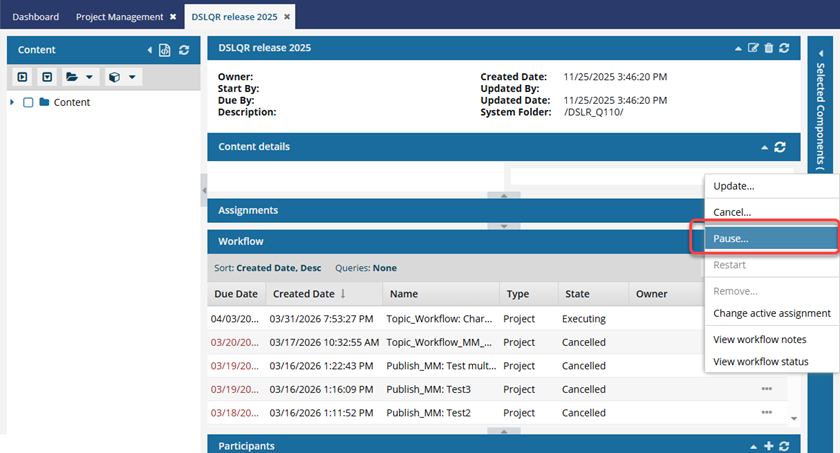
In the workflow's row, click the Options menu and select Pause.
 Results:
 - The user who is assigned to current active assignment sees an in-app notification.

- The State of the workflow changes to Paused.
- The State of the current assignment is unchanged.
- If the assigned user tries to complete their assignment while the workflow has a State of Paused, the user sees the following error: You cannot complete this task because the workflow has been paused.
- The current project assignment cannot be completed, accepted, or rejected.
- To take any of these actions, you must first Resume the workflow.
- Follow the steps in either of the following topics:
- The user who is assigned to current active assignment sees an in-app notification.