Automate sequential reviews with a workflow template
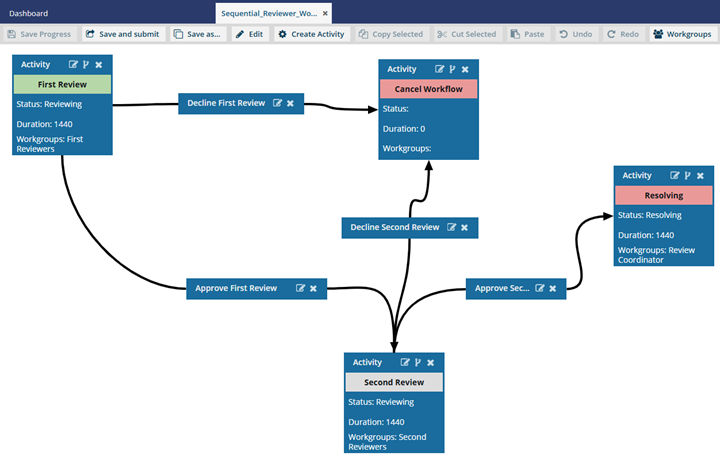
Inspire provides you with a workflow template for the process of getting reviews on content from two users. After you assign users to review components, Inspire automates the hand-offs for you. Inspire sends a notification to reviewers assigned to the first phase, and when they complete their review, Inspire assigns a review to the second set of reviewers. Project coordinators also receive notifications as the reviews progress and can manage the workflow at any time.
 Required permissions
You must have permission to the Projects Module to work with projects and workflows. Other than that, you do not need special permissions to create, edit, or delete workflow templates.
 However, keep in mind that administrators and other users can set permissions on components and folders.
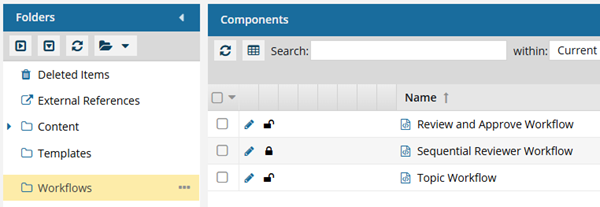
- You must have permission to edit the workflow template component.
- You must have folder permissions where the template is stored.
- For details on how to check and set permissions, refer to: Set permissions
 For a complete list of permissions, including starting a workflow from a template, read: Workflow permissions.

What do you want to do?
- Learn more about Inspire's review workflow in Understand the review workflow.
- Use Inspire's template to Start a review workflow from an existing project.
- Create your own review workflow. Follow the steps in Update the review workflow template.