Define elements in the Attributes pane
You can edit Inspire components in an XML editor that uses Oxygen functionality. When you're working on a document in the Oxygen-based editor, you can provide extra information about an element in the Attributes pane. For example, if you insert an image element, you can add an attribute to specify that the alignment of the image on the page should be in the center. After you add an attribute, you can go back and change its value or delete it. Deleting an attribute doesn't delete the element.
 Before you begin
An administrator can mark any attribute as Protected.
- This may prevent you from working with attributes unless you have special permissions.
- If you encounter a permission error when saving your attribute changes, contact your Administrator.

 You may or may not see element IDs. An administrator can configure an element to never be assigned an ID.
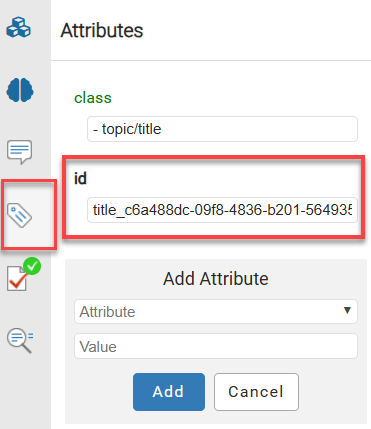
For example, if a Ditabase component is created or imported into Inspire, normally an ID is automatically added to the root-level <Dita>. For Ditabase, this ID renders the component invalid when opened in the XML editor because an ID is not allowed on a DITA component.
If an element is configured not to use IDs:
- When content is imported, no ID is generated
- In the Oxygen editor, no ID is generated when the Generate IDs or Save and Submit options are used
- This behavior is enforced even if the AautomaticIds option is turned on
In the Oxygen editor, when you select  Generate IDs, Inspire only puts a valid ID on elements if the NeedsId identifier is selected in their element configuration.
Administrators can follow the steps in: Configure an element as NeedsID.
 FAQ's
FAQ'sWhich attributes can I use?
Attributes have name and type properties defined within your DTD or schema. Whatever attributes are included in your schema are available in the Oxygen-based editor.
- Not all attributes are available for all elements. The list of attributes will change depending on the element. For example, you can set the align attribute on an image, but not on a link element.
- You can add attributes to your schema and edit them using the full version of Oxygen. To learn how, read Oxygen's documentation on Built-in Author Mode Operations.
Does every element need an attribute?
Maybe. In your schema, you can specify whether an attribute is optional or mandatory. If an attribute is defined in your DTD or schema, you can only add it once to each element. For example, it wouldn't make any sense to add three align attributes to one image element specifying that the image should be centered, right-aligned, and left-aligned. The XML application using your document wouldn't know which setting to use.
How do I know what the attribute values mean?
The DITA specification contains a language reference section that describes common attributes available for most DITA elements. You can read more about it on Oxygen's Attributes page.