Configure an element as NeedsID
As an Inspire administrator, you can add elements to configure component relationships. When updating elements, you can set a property to specify that an element needs an ID. In the Oxygen editor, when an author selects  Generate IDs, Inspire only puts a valid ID on an element if the NeedsId identifier is selected in their element configuration. For example, this rule applies to the glossentry and glossgroup elements.
 Tips and tricks
You can also set this property when you create a new element. Follow the steps in: Create an element.

To update an element:
-
From the
 Administration menu, select Advanced Settings, then Element Management.
-
On the Element Management tab, select the element that you want to update and click Update
 .
.
-
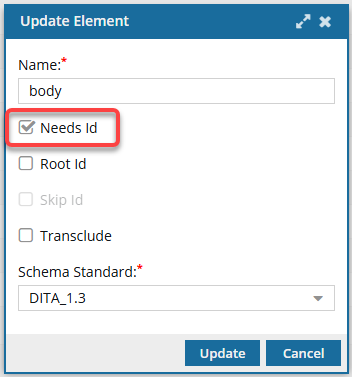
On the Update Element screen:
-
Select Needs Id.
 When the user clicks Save and Submit or Generate IDs, an ID is assigned to all instances of the element.
 If you do not select Needs Id, when the user clicks Save and Submit or Generate IDs, an ID is NOT assigned to any instances of the element. The user can manually add an attribute type of ID if necessary.
-
Select Needs Id.
-
To save your changes to the element, click Update.
 Results:
- You are returned to the Element Management screen.
- Users must log out and back in to see the changes in the Oxygen editor.