Use profiling attributes
Profiling is a term used in the DITA and DocBook schemas to describe conditional text. This feature is useful when you need to produce more than one version of a document, and the versions differ in minor ways. With conditional text, you keep all the ways a document can vary in one component and select the variations you want at production or publication time. For example, you can identify conditional text with profiling attributes to create different versions of a document for different audiences.
 FAQ's
FAQ's
- When do I add profiling attributes to a component?
- Can I create new profiling attributes?
- Can I create a profiling attribute with a namespace?
- Can I delete profiling attributes?

When do I add profiling attributes to a component?
- Administrators can customize profiling attributes with specific groups and values you want to use for filtering and flagging. Administrators can also add new profiling metadata conditions using the @props attribute.
- Authors create a single component with some elements marked as conditional. You apply profiling attributes to an element in a component during the authoring process.
- After profiling attributes are applied to content, users and administrators can filter the content based on specific attribute values to view or publish the custom content.
- When you process a component with profiling attributes, you can specify which conditions apply for the version of output you want. This tells your stylesheet to include or exclude the marked text to satisfy the conditions.
Can I create new profiling attributes?
Yes, if you want to add them to a custom schema and load a new Oxygen framework.
Otherwise, no, you can't create new profiling attributes.
- You can add values to the attributes that Inspire provides by default. These include:
- audience
- otherprops
- platform
- props
- product
- You can also create new profiling conditions. Inspire provides you with the basic profiling attributes for each schema, and you can add your own values to them. One of these basic attributes is @props which you can use to create new profiling condition

Can I create a profiling attribute with a namespace?
Yes.
Inspire supports using an XML namespace that is identified by a prefix. When an attribute uses that prefix, it’s said to be in that namespace. After creating the namespace as an attribute and marking it as Profiled, you can add values to the namespace. Then users can select the namespace and apply its values to content for use when you need to publish or translate different versions of the same document.
For example, to apply profile filtering to an attribute with a language namespace (xml:lang):
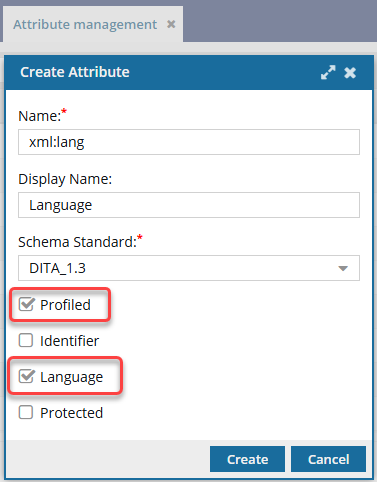
- In Attribute Management, an administrator creates an attribute with the following properties:
- Name is xml:lang
- Display Name is Language
- Language option selected
- Profiled option selected
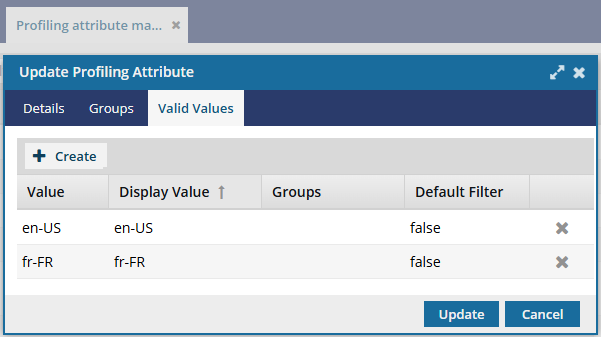
- In Profiling Attribute Management, an Administrator configures xml:lang with Valid Values of en-US and fr-FR.
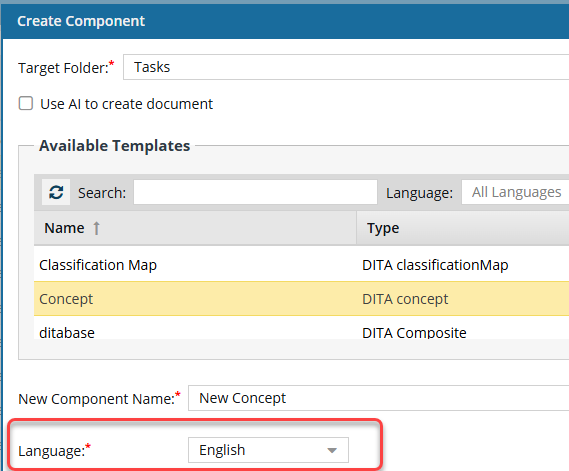
- In the Components browser, a user creates or opens a component that has a Language setting of English. This ensures the xml:lang namespace value is set to en-US on the root element.
- When a user opens the Publish Component screen to publish the component or a map containing the component, they can add a filter to create a document in just one language. If they want an all-English document, in the Language category they would choose with the value of en-US.
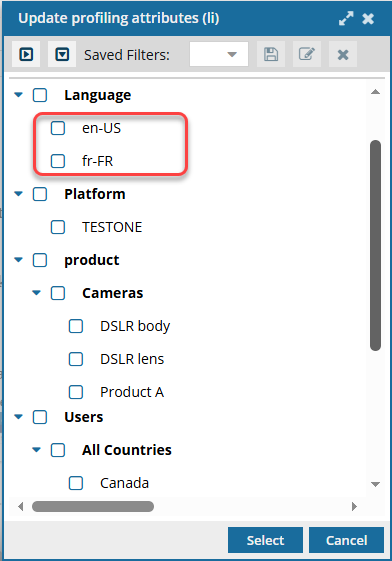
- When a user opens the Publish Component screen to publish the component or a map containing the component, they add a filter in the Language category with the value of fr-FR.
 The same functionality works when a user opens the Translate component screen to send the component or a map containing the component to be translated.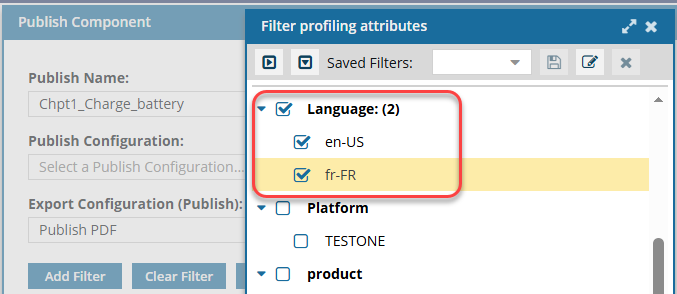
Can I delete profiling attributes?
Not through the Inspire tools.
If you want to remove a profiling attribute you must remove them from the schema and load a new Oxygen framework.