Work with review workflows
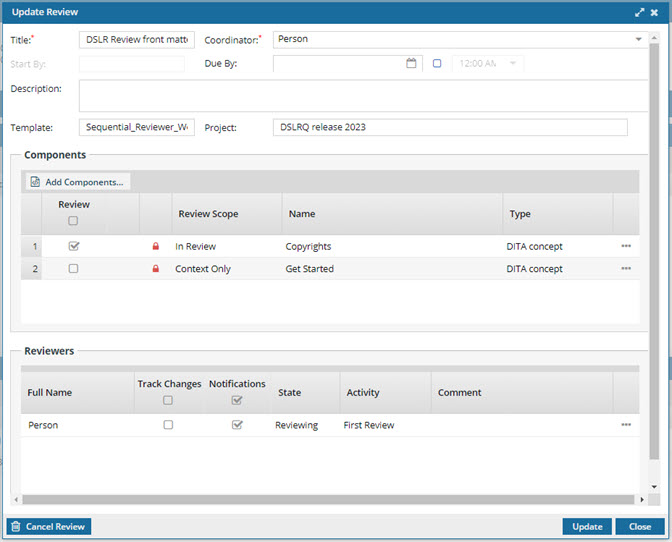
Users with permissions can easily update workflow details to make changes to the components being reviewed and the users who are completing the reviews.

 Tips and tricks
- You can change the current workflow activity. This may be necessary if a user advances the workflow and then realizes they need to do something else, or if changes were made and previous editors need to review them. Follow the steps in: Change the current activity in a workflow.
- You can only update the following details of an active review workflow:
- Title
- Coordinator
- Due By
- Description
- Filters
- Add or remove Components
- Reviewer editing permissions
- Reopen a review for a user
- Add or remove a User
- You cannot update the following details of a topic workflow:
- Start By
- Template
 To change these details, you must cancel the entire workflow and re-create it.
- Navigate to associated places and topics. After you open a project, you can go to the Workflow pane, and for any review workflow, use
 the Options menu to:
- Go to—Open the Reviews Management tab and see the review highlighted. Read Go to a review from the workflow pane.
- Open review—Open the review editor to select a topic and review it. Read Open a review from the workflow pane.
- Create report—Open the Review Report screen to select report options and create the report. Read Create a review report from the workflow pane
- If a review in a workflow is still active, the user of the next task cannot advance the workflow until the review is marked as Completed or Canceled. Users will see an error if they try to advance a workflow while a review is still active.
The options available to you when updating a Sequential Reviewer workflow are different from those available for a topic workflow. For more details, read Work with topic workflows.