Use the Workflows module to change the current activity
Sometimes it is necessary to change the activity workflow task to a different one. For example, if a user advances the workflow and then realizes there was something else they needed to do, or changes were made and previous editors need to review them.
 Requirements
- To create, view, update, and delete workflows you must either be an Administrator, the project Owner, or have the following permissions:
- Create, read, update, and delete permissions to the
 Projects module.
 - For the Projects module, your user account must be listed under the following Property: can_initiate_assignment.
- If you are an administrator, refer to Allow users to create project assignments and workflows.
- Create, read, update, and delete permissions to the
- If you selected Create Multiple Assignments in the template in use, you will not be able to change the current activity in a workflow.
- You can cancel the workflow and edit the template so that multiple assignments are not created. Follow the steps in: Customize Activities and Transitions for a topic workflow template.
- You can also start a new workflow based on a template where multiple assignments are not created.

 Tips and tricks
- You can also access the Change active assignment in the Projects module in the Workflows panel. Follow the steps in: Use the Projects module to change the current activity.
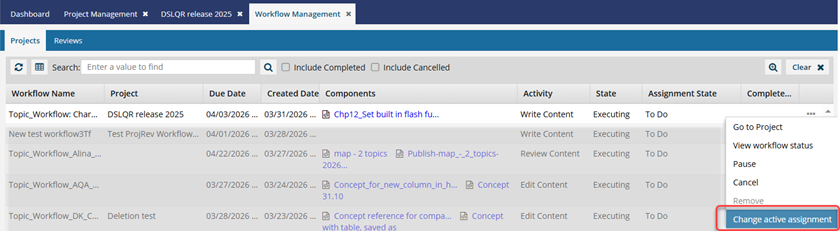
- The Change active assignment option is only available for workflows that have a State of Executing.
To use the Workflows module to change the current activity:
-
From the top menu, select
 Workflows.
-
Find the workflow that contains the activity you want to change.
 Important notes:
- For help searching, follow the steps in: Find a workflow on the Projects tab.
- The workflow must have a State of Executing.
-
In the activity's row, click
 the Options menu and select Change active assignment.
-
On the Transitions screen,
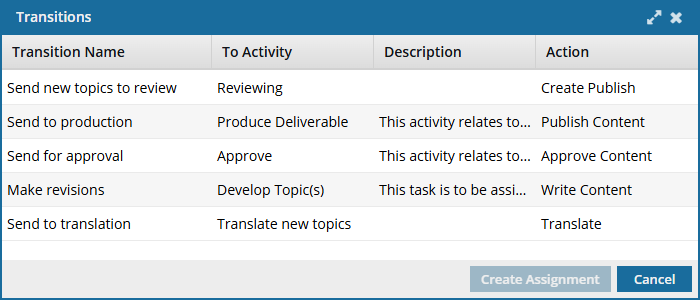
- Select the transition that moves the workflow to the activity you want to be current.
- Click Create assignment.
-
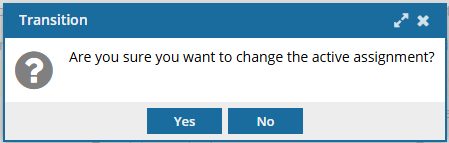
Confirm your change on the Transitions screen by clicking Yes.
 Results:
 - The State of the current assignment is set to Completed.
- The workflow moves to the selected transition. For example, you might see a notification that a new assignment is created.