Sign into Inspire
Use the email notifications that contain your email address and the URL to access Inspire for the first time.
When you sign into Inspire, your credentials are verified using Single Sign On (SSO). SSO can be set up in two ways:
- TP Auth—The SSO is set up by TransPerfect (TPT). If your organization is using this scenario, the Inspire URL redirects you to a TpAuth sign in page. There you must use your TP Auth credentials to sign in to Inspire. Do not use your corporate credentials here.
- SAML—The SSO is set up by your company. If your organization is using this scenario, the Inspire URL redirects you to a company-specific sign in page. There you must use your corporate credentials to sign in to Inspire.

 By default, if you are inactive in Inspire after 15 minutes, you will be automatically signed out.
- An administrator can disable this timeout or change the amount of time that you can remain inactive in Inspire. Administrators can follow the steps in Set a user time out.
- If an inactivity timer is set, after you exceed that time, if you are still inactive you will be automatically signed out. You are returned to the Sign in page.
- If you aren't sure how long you can remain inactive and still be signed into Inspire, contact your administrator.
To sign in to Inspire using TpAuth:
-
On the TransPerfect Sign in to GlobalLink Inspire screen:
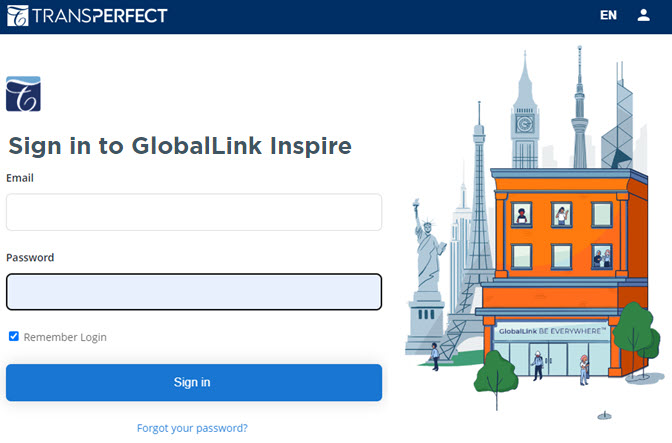
- In Email, enter the address to be used for your Inspire account.
- In Password, enter the string of numbers and characters that authenticates the account used in Email.
- Optionally, to save your credentials in your browser settings so they are automatically populated the next time you see this screen, click Remember Login.
- Click Sign in.
 Result: After you successfully log in, you see the Inspire Dashboard.
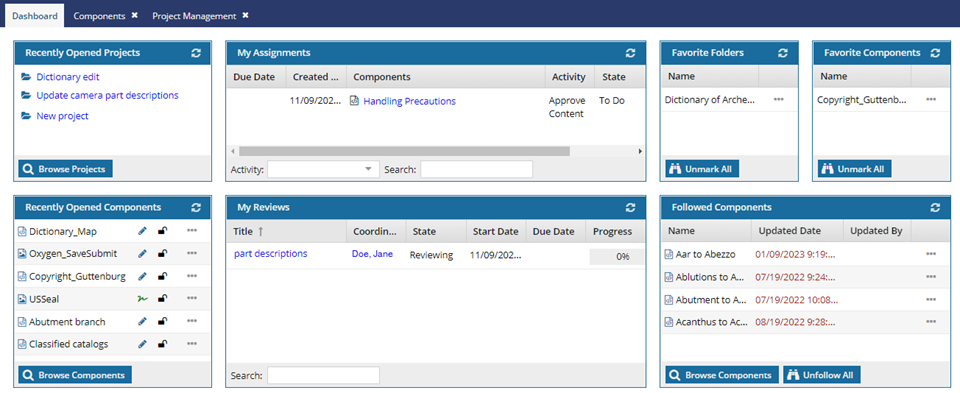 After you sign in, by default, if you remain inactive in Inspire for 15 minutes, you are automatically signed out. You are returned to the Sign in page.
- If you aren't sure how long you can remain inactive and still be signed into Inspire, contact your administrator.