See the language count in a translation job
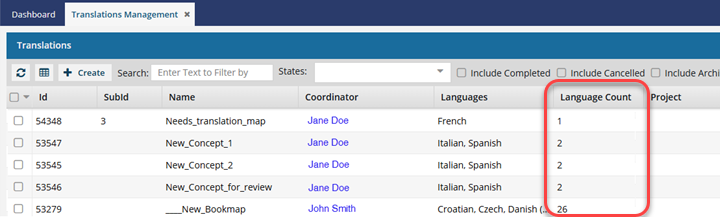
On the Translation Management tab, you see a list of translation jobs. If you want to see more details about jobs on this main grid, you can show hidden columns, such as Language Count. This number tells you the total number of target languages used in a translation job.
 Required Permissions
 For full access to all translation jobs, you must be an administrator.
- An admin can edit and cancel any translation job regardless of Translation module permissions.
- To configure permissions, administrators can follow the steps in: Update module access permissions.
- For full access to your own jobs, you must be a coordinator.
- Coordinators retain access to their own jobs regardless of Translation module permissions.
- A user who is the coordinator of a job can still edit and cancel it even if they have no explicit Translation module-level Update permission.
- To edit and cancel any translation job, a non-admin user must have both the Read and Update permissions for the Translation module.
- To see all jobs, a non-admin user must have the Read permission for the Translation module.

 Tips and tricks
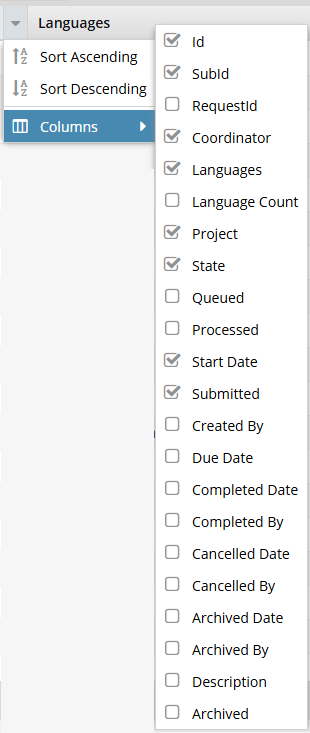
- This column is not displayed by default.
- When you export jobs in the grid to a CSV, this column is included regardless of whether it is shown or hidden.
- You can sort by this column.
- For a complete list of columns and whether they are hidden, refer to: Things you can do in the Translations module.
To see the language count in a translation job:
-
From the top menu, select
 Translations.
-
Click
 the down arrow to see the column menu.
-
Click anywhere on the screen outside the column list.
 Results: You see the Language Count column listed after the Languages column and before the Project column.