See reference only components for a translation job
After you send components to translation, you can review any component you included as Reference only. These are components added to a translation job to be used as a reference during the translation process. You can't make any changes on this tab after a translation job has started.
 Required Permissions
 For full access to all translation jobs, you must be an administrator.
- An admin can edit and cancel any translation job regardless of Translation module permissions.
- To configure permissions, administrators can follow the steps in: Update module access permissions.
- For full access to your own jobs, you must be a coordinator.
- Coordinators retain access to their own jobs regardless of Translation module permissions.
- A user who is the coordinator of a job can still edit and cancel it even if they have no explicit Translation module-level Update permission.
- To edit and cancel any translation job, a non-admin user must have both the Read and Update permissions for the Translation module.
- To see all jobs, a non-admin user must have the Read permission for the Translation module.

 Tips and tricks
- Reference only components aren't locked in Inspire.
- Reference only components aren't returned from GlobalLink Enterprise (formerly known as Project Director).
- You can send the same files for translation and reference only. This is helpful when the linguist might need to refer to the original, such as a map, when making changes.
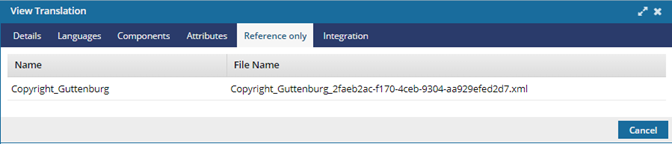
 The tabs you see when you open the Translation screen will vary depending on the type of Translation Project you select when creating the translation job. On the Details tab, this is shown as Vendor.
For more information about sending components to translation, read:
If there were issues when creating the translation job, you also see the Log tab.
- Only errors that occurred during job creation are listed here. Any other errors encountered afterward are not listed here.
- The information on the Log tab is the same as what you receive with in-app notifications and in the Notifications module.
- For more details, read: Use the Log tab after creating a job.
To see which components are attached in a translation job for reference only:
-
Select
 Translations.
-
On the Translations Management tab, in the list, find the translation you want to view more details for.
 If you can't find the job you're looking for, do any of the following:
- If there are multiple pages, scroll to the next page using the controls at the bottom of the list.
- Sort the list by clicking a column heading.
- Search for items in the list that contain a keyword or phrase.
- Limit the list to show only jobs in a specific state. Go to States, select an option, then click the search icon
 .
. - Show hidden jobs by selecting the checkbox for Include Archived. By default, the options for Include Completed and Include Cancelled are selected.
-
To open the View Translation dialog, double-click the translation job.
You can also right-click on the job or use the job's
 Options menu and select View.
 -
You can see which components were included as reference.
This tab is read-only.