Cancel an assignment
If work can't be finished on an assignment, or you don't need the work done for the project, you can cancel it. Project owners associated with this assignment receive an email notification that you've canceled the assignment.
 Required permissions
- Create, read, update, and delete permissions to the
 Projects module.
 - Only Project owners can cancel an assignment.
- If you're an administrator or project owner, instead of canceling an assignment, you can set it back to a state of To Do or In Progress if you need work to be done on the assignment.

To cancel an assignment:
-
Click Projects.
-
On the Project Management tab, double-click to open the project that contains the assignment you want to complete.
 You can also open a project by:
- Right-clicking the project and then selecting Open.
- Clicking
 the Options menu and then selecting Open.
-
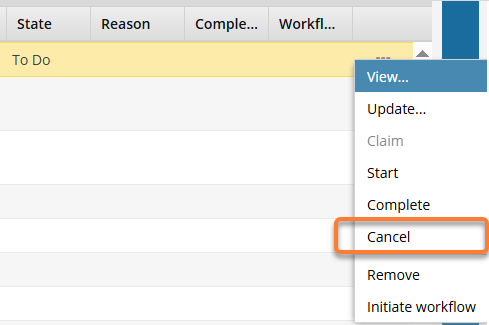
In the Assignments pane, right-click the assignment and select Cancel.
 You can also complete an assignment by:
- Selecting the assignment, clicking the Options menu, and selecting Cancel.
- Selecting the assignment, clicking
-
On the Cancel Assignment screen, click Yes.
 Results:
- In the Assignments pane, the assignment has a state of Cancelled.
- Participants associated with this assignment receive an email notification that the assignment was cancelled.
- If you are the Project Owner and a participant for the assignment you just updated, you won't receive an email notification.