Manage elements
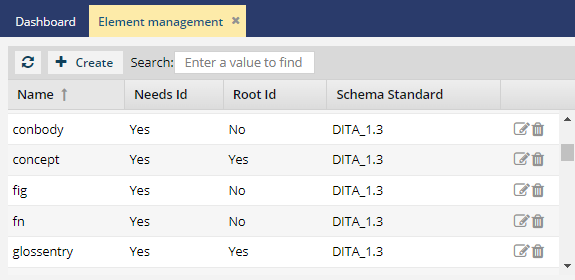
As an Inspire administrator, you can create the elements you need to build your XML components. In addition to creating, updating, and deleting elements, you can set properties to specify if an element needs an ID, is a root element, and the schema standard that must be used when validating the element.

 An XML element is the basic construct within an XML document.
- An element may contain text, attributes, other elements, as well as entity references, and processing instructions.
- Elements allow complex hierarchical data to be described.
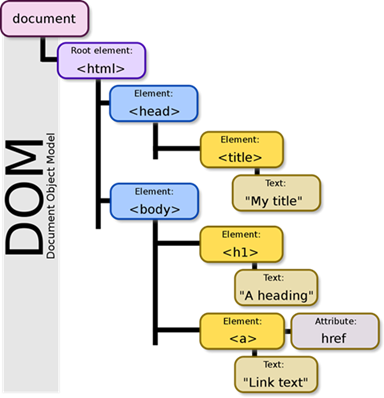
Everything in an XML document is a node. For example, the entire document is the document (root) node, and every element is an element node.
- An XML file begins with the
<xml></xml>tags and has an opening declaration that defines the XML version used in the document. The remaining tags within the XML document are XML elements. - When managing elements in Inspire, you can identify elements that need a root ID.
- Each XML document has exactly one root element. It encloses all the other elements and is, therefore, the sole parent element to all the other elements.
- In Inspire, you know root elements as topic types, such as a Concept, Glossary, or Task.
- All other elements inside the topic type are not root elements, even though they might contain other elements. For example, in the illustration above, the
<head>element is the parent in the hierarchy of the<title>element. However, the<head>element is not the parent element for<body>, and is not the sole parent or root element.
 Tips and tricks
Skip Id. When an administrator creates or updates an element in Element Management, they can indicate whether the element should never be assigned an ID.
- This option is used when a DTD doesn't support an ID for an element.
- For example, if a Ditabase component is created or imported into Inspire, normally an ID is automatically added to the root level
<Dita>. For Ditabase, this ID makes the component invalid when opened in the XML editor because ID is not allowed on a Dita component.
- For example, if a Ditabase component is created or imported into Inspire, normally an ID is automatically added to the root level
- By default, the Skip Id option is not selected.
- If an element has Skip Id set to true:
- When content is imported, no ID is generated.
- In the Oxygen editor, no ID is generated when the Generate IDs or Save and Submit options are used.
- This behavior is enforced even if the AutomaticIds option is turned on.
NeedsId. In the Oxygen editor, when you select  Generate IDs, Inspire now puts a valid ID on elements only if the NeedsId identifier is selected in their element configuration. Administrators can follow the steps in: Configure an element as NeedsID.