Find assignments on the Projects tab
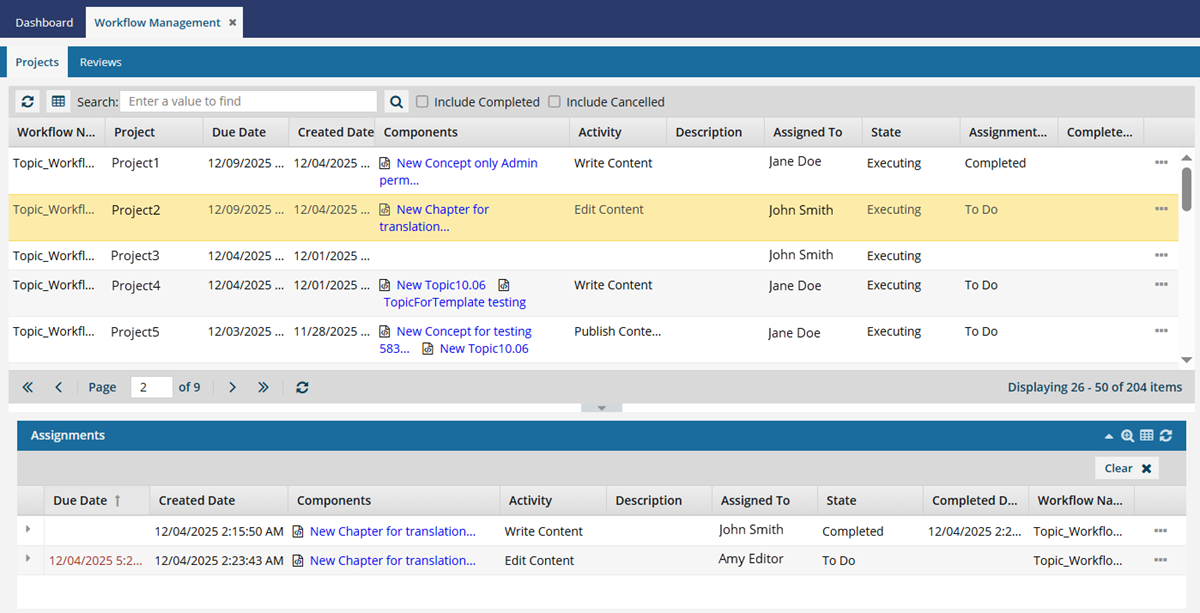
You can use the Workflows module to see all project assignments created in Inspire in one place. On the Projects tab you can see all project workflows and assignments.
 Tips and tricks
- Review assignments, as a part of project workflow activities, are also displayed on the Projects tab.
- If you want to see only Review type workflows, follow the steps in Find review workflows on the Reviews tab.
- In the top pane, you can see all project workflows listed. This list shows you all workflows created across every project in Inspire. By default, workflows that have been Completed or Cancelled are not included, but you can select an option to add them to the list.
 In the top list of projects and workflows, you can search in the following columns:
- Workflow Name
- Project
- Due Date
- Created Date
- Activity
- Description
- Assigned To
- State
- Assignment State
- Completed Date
 Columns you can't search in:
- Components
- In the top pane, by default, only workflows for projects that haven't been cancelled or completed yet are shown. To display those project workflows, select the Include Completed and Include Cancelled options.
- In the Assignments pane you can see all tasks for a selected workflow. After you select a workflow in the top pane, you can see each assignment listed on their own line and sorted by default according to the assignment's Due Date.
- The Advanced Query Builder is only available when searching for an assignment in the Assignments panel.

How do you want to find an assignment on the Projects tab?
- Use a basic search to find a project first
- Use a basic search to find a workflow first
- Use advanced search to find a project, workflow, or assignment
- I've already found it in the top grid. I want to see more details in the Assignments panel.
