Resolve a review
After all users mark their individual reviews Completed, the review moves to a state of Resolving. At this point, as the review coordinator, you have the option of doing your own review. You're also required to accept or reject all changes and remove all comments. Optionally, review coordinators can edit or delete discussions relating to the review.
 Tips and tricks
- When you're resolving comments in a review, if you need help using the editor, read Use tools in the Review Editor
- When you complete a review, after you resolve the changes and click Complete, you can approve components in the review. This approval feature applies only to reviews that are not part of a workflow.

 Critical notes
You may encounter restrictions when editing or deleting discussion comments made in the Collaboration panel for a component (Component Discussions pane) and the review (Discussions pane).
- No new discussions can be saved by any type of user when the review is in the State of Resolving.
- The Create button is active in both the Component Discussions and the Discussions panes.
- You can enter text on the Create Discussion screen, but after you select Create, you see a warning that "Discussions can only be created during the review phase."
- Users who are not the review coordinator or an administrator can open the Collaboration panel when the review is in the Resolving state, but the following panes are greyed out and not available.
- Component Discussions
- Discussions (for the entire review)
To resolve a review:
-
Click
 Reviews.
-
Right-click the row, and then select Open review.
 You can also access this option by clicking
  the Options menu and selecting Open review.
 -
Use the Review components pane to quickly see which components include changes.
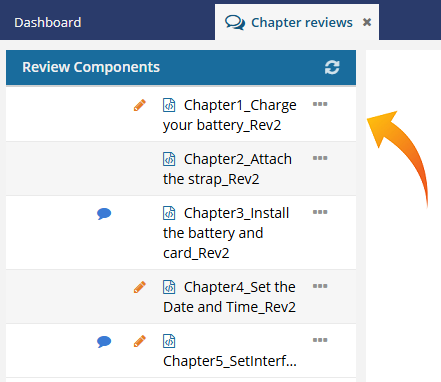 When resolving a review, you can quickly see which components include changes:
- Tracked changes
 . The coordinator must review the edits and either accept or delete them.
 - Comments
 . The coordinator can reply to a comment, however all comments must be removed before the review can be resolved.
 - To see the number of comments or changes, hover over an icon.
- The icons only track changes and comments made during the Reviewing phase. If comments and track changes were added to the component before the Review started, they will not cause the icon to display or be included in the icon's number.
- Tracked changes
-
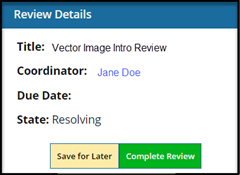
In the review editor, in the Review Details pane, click Complete Review.
-
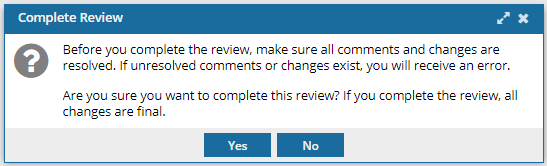
On the Complete Review screen, click Yes.
 Results:
  After you save all components in the review without any pending changes or comments, the Approver must decide to approve some, all, or none of the components in the review before it can be marked as completed.
- If you are not assigned to the review Approver role, you have completed the steps to resolve a review. The review Approver is notified that the review is ready to be approved.
- If you are also assigned to the review Approver role, complete the steps in Approving review components.