View a branch report for one component
You can create a component branch from an existing component and add the branch to a specific component folder. When you branch a component, you can choose whether the branch maintains all, some, or none of the content referenced in the source component. To see a report on the relationships a component has with other components, if it's the source of a branch, is part of a branch, or is both, and find the location of all components in the branch, you can generate and view a branch report.
 Tips and tricks
A branch report contains the following information:
- Target component (display name and filename)
- Source component (display name and filename that was used to create the branch)
- Language (of the Target component in Language:Region pair format)
- Branched By (First and last name of the user who created the branch)
- Branched Date (when the branch was created in MM/DD/YYYY format)
- If you want to generate more than one branch report at a time, you can select multiple components and use the Selected Components panel.
 View a Branch report for selected components
 - When you unlink a branched component from a branch, Inspire creates a report for you. For more details, read Relink a branched component.
- To create a report about a branched component's relationship in another branch, you can use the Branch Management tool. Create a branch report from Branch Management
- To see and manage branch relationships, you can also Use the Branch Management tool
 Before you begin
- You cannot create a branch report from inside a project.
- Branch reports use the source of a branch to find all relationships for the selected component.
- You cannot create a branch report from a branch that is marked with
 Is a branch (a green branch icon).
 - You can create a branch report from a branch marked as
 Has a branch or
  Has and Is a branch.
- You cannot create a branch report from a branch that is marked with

To view a branch report for one component:
-
Click
 Components.
-
In the Components pane, find the branched component you want to include in the report.
 You must select a branch marked as Has a branch or Has and Is a branch.
- Branch reports use the source of a branch to find all relationships for the selected component.
- You cannot create a branch report from a component that has no branches, or that is marked with Is a branch (a green branch icon).
-
On the branched component, right-click (or use the
 Options menu). In the Components select Reports, and then select Branch report.
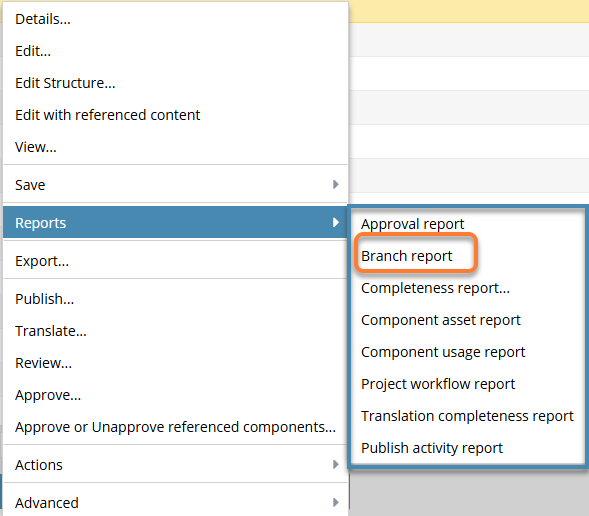
 Results:
- You see a notification for each component that the report process has started.

- You see a notification for each component that the report process has completed.

- On the Notifications tab, you can see the report details.
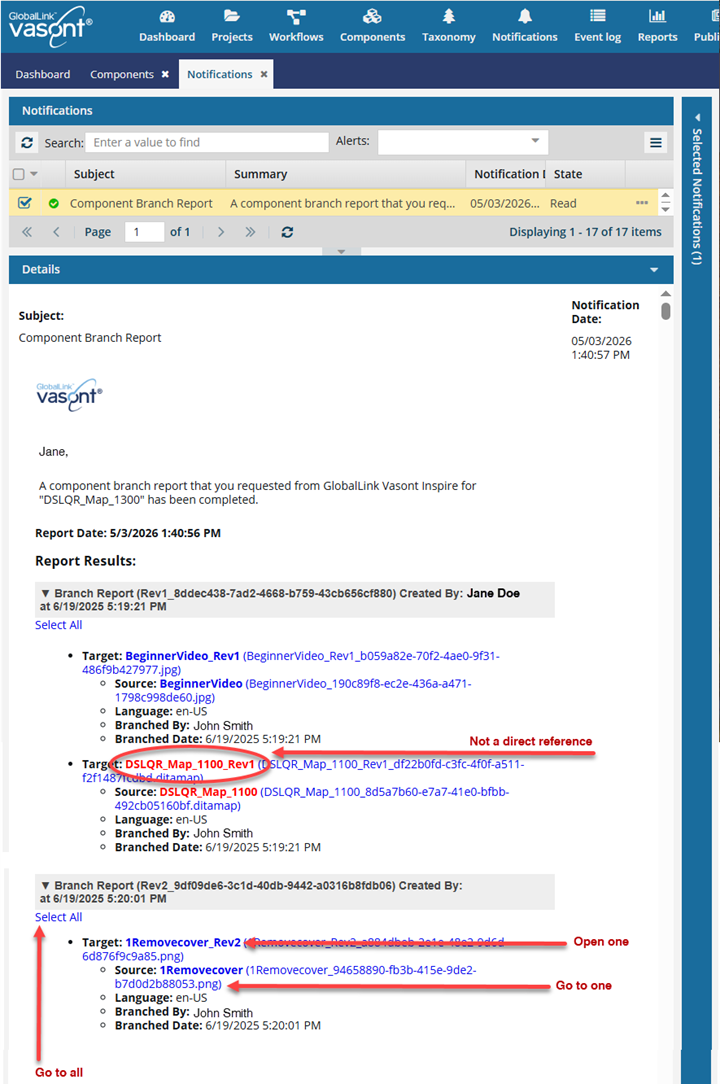
You can use this report to do the following:
- See indirect references. You can find components (shown in red) that have references in common with the selected component (DSLQR_Map_1200).
- The components shown in red contain one or more of the same topics as in the source component.
- They contain a reference as a branch of another branch, but not a direct reference from the source component.
 This is helpful because it shows you that there are branched maps you might want to review and consider connecting the source component to. Red references are also used to show components that have been unlinked from the branch. For more details, read Relink a branched component.
- Go to all. If you want to open the folder that contains all the components listed in a section of the report, click the Select All link.
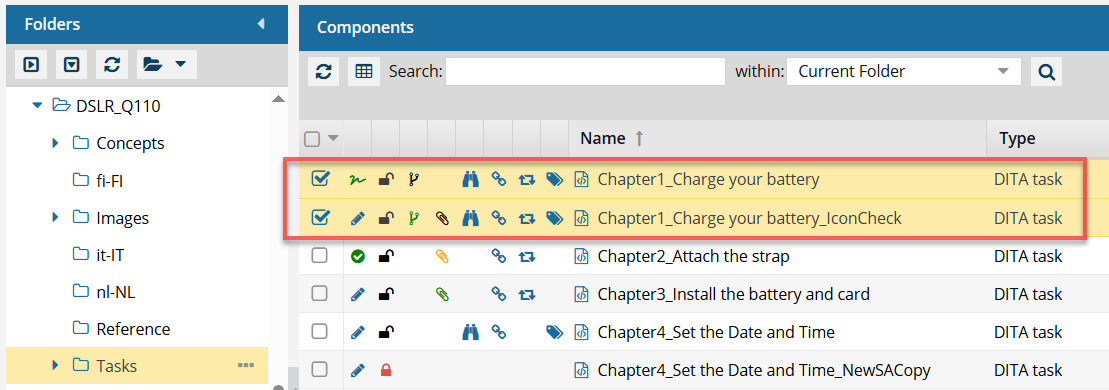
- If you click this link from an email, a browser tab opens, and Inspire opens to the Components browser.
- If you click this link from a notification inside Inspire, the Components browser opens.
- In the browser, you see all the components highlighted from that section of the report.
- If the components are in different folders, you see the items from the first folder listed in the Folders pane.
- The components are also listed in the Selected Components pane.
- Open one. If the component's content needs to be updated, you can click on the component Name, which is a link that opens the component in the Oxygen editor.
- The Name is listed first.
- The Name does not contain the file extension. For example, "Chapter1_Charge your battery_IconCheck".
- If the component is locked or a binary, you see the component in a read-only viewer.
- Go to one. If you need to update a component using a system function, such as Rename, you can click on the File Name which is a link that opens the folder where it's stored.
- The File Name is listed second, after the shorter Name and in parentheses ().
- The File Name contains the file extension. For example, "Chapter1_Charge_your_battery_IconCheck_070e9999-fe40-4747-b57d-ba1096b925ed.xml.
- See indirect references. You can find components (shown in red) that have references in common with the selected component (DSLQR_Map_1200).
- You see a notification for each component that the report process has started.