Track your changes
When you're working with other users to develop content in the Oxygen-based editor, you can use change tracking to show other users the changes you've made. The editor displays inline changes to the content in blue underlined text. The editor tracks inserted, moved, and removed text. Other changes such as formatting and structural changes aren't tracked.
By default:
- The
 Change Tracking option is not turned on in the Oxygen editor.
 - You can make changes to text and they are NOT highlighted.
- You can turn Change Tracking on.
 An administrator can force Change tracking to work in one of the following ways for specific users and roles:
- Force Change Tracking to stay on: All changes are highlighted and Change Tracking cannot be turned off.
- Force Change tracking to stay off: No changes are highlighted, and Change Tracking cannot be turned on.
 Administrators can follow the steps in: Grant permissions to options in Oxygen.

To track your changes:
-
In Inspire, go to
 Components.
-
On the toolbar, click the track changes button.
Changes are shown in blue underlined text.
- New text is blue.
- Moved text shows the location where you cut the text as strike through, and the location where you pasted it as new text in blue.
- Removed text is formatted as strike through.
-
You can make any of the following changes:
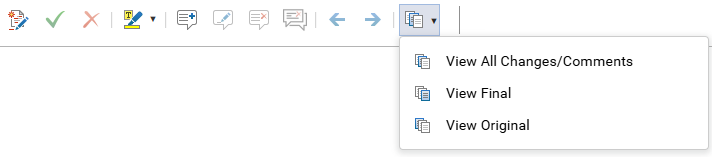
Accept the selected change: Incorporate the edit into the document, making the change permanent and removing the markup, which is necessary for finalizing the document and removing the editing history.
- Toolbar option:
 Accept Change(s)
 You may not see this option if an administrator has configured it to be disabled in Oxygen for your user account or for a role that you belong to.
Reject the selected change: Remove an unwanted edit and restore the text to its original form, or remove an edit if you disagree with a suggested change and want to keep the original wording, ensuring the final document reflects your precise intent rather than the revision.
- Toolbar option:
 Reject Change(s) You may not see this option if an administrator has configured it to be disabled in Oxygen for your user account or for a role that you belong to.
See the previous change: Move your cursor to an earlier edit in the document's revision history. It allows you to inspect, accept, or reject a specific revision that happened earlier in the editing process, without affecting the changes you have already reviewed.
- Toolbar option:
 Previous Comment or Change
See the next change: Move your cursor and view to the location of the next tracked edit in the document. It allows you to systematically review each revision one by one without having to manually scan the entire document.
- Toolbar option:
 Next Comment or Change
Select which changes to see: view the different versions of the text as it is edited when Change Tracking is turned on.
- Toolbar option:
 Track Changes: View All Changes/Comments
All changes (including comments) are highlighted in the document.
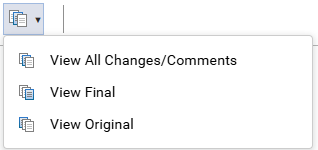
- View All Changes/Comments: Shows all edits made to the document after Change tracking was turned on are displayed. An administrator can force Change tracking to work in one of the following ways for specific users and roles:
- Force Change Tracking to stay on: All changes are highlighted and Change Tracking cannot be turned off.
- Force Change tracking to stay off: No changes are highlighted, and Change Tracking cannot be turned on.
You may not see any changes if an administrator has configured Change Tracking to be disabled in Oxygen for your user account or for a role that you belong to. - View Final: Shows the text after all edits have been accepted or rejected. Important notes:
- You may not see any changes if an administrator has configured Change Tracking to be disabled in Oxygen for your user account or for a role that you belong to.
- You may not see any changes if an administrator has configured the Accept and Reject buttons to be disabled in Oxygen for your user account or for a role that you belong to.
- View Original: Shows the text before any changes were made and before Change tracking was turned on. An administrator can force Change tracking to stay off. In this case, no changes are highlighted, and Change Tracking cannot be turned on in Oxygen by your user account or for a role that you belong to
- View All Changes/Comments: Shows all edits made to the document after Change tracking was turned on are displayed.
- Toolbar option:
-
When you're done making changes, on the toolbar, click
 Save or
  Save and Submit.