Start a review workflow from an assignment
When you're working on assignments for a project, you can convert that one assignment into a workflow with multiple tasks that are automated by Inspire. After you select the project assignment, you can select an action called Initiate workflow. Inspire marks the assignment as completed and opens the Start a workflow screen.
 Tips and tricks
- The assignment must be in one of the following States to use the Initiate workflow option:
- To Do
- In Progress
- If the Initiate workflow option is not available, the assignment is already being used in another workflow.
- Inspire checks to see if the component(s) you want to add are in another assignment, project workflow or review workflow. You see warnings if a component is already in use. If you want, you can close the warnings and create the assignment or workflow anyway.
- You can edit the default topic workflow template or save a copy to update it so that it reflects your unique business workflows.

 Required permissions
Project permissions
To work with projects, you must have permission to the Projects Module.
- By default, only users with the following permissions can create project workflows and assignments:
- Administrator permissions
- Access to the Project Module with the Create permission
- Even if you don't have these permissions, you can be granted a special permission to create workflows and project assignments after a project is created.
- If you are an administrator, refer to Allow users to create project assignments and workflows.
Workflow permissions
To create, view, update, and delete workflows, you must either be an Administrator, the project Owner, or have the following permissions:
- Create, read, update, and delete permissions to the
 Projects module.
 - For the Projects module, your user account must be listed under the following Property: can_initiate_assignment.
- If you are an administrator, refer to Allow users to create project assignments and workflows.
Review workflow permissions.
To work with Review workflows, you also need:
- Create, read, update, and delete permissions to the
 Reviews module.
To start a review workflow from an assignment:
-
From the top menu bar, select Projects.
-
To open the project, do one of the following:
- Double-click in the project's row.
- Right-click in the project's row and select Open.
- Go to the end of the project's row, click
 the Options menu, and select Open.
-
Go to the Assignments panel.
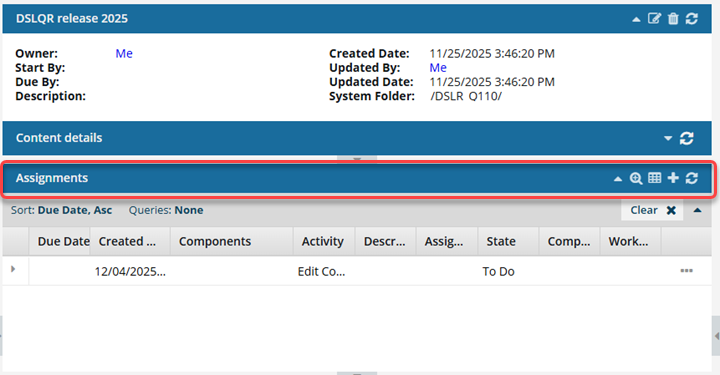
 If the panel is not open, go to the Assignments title bar and click
  the down arrow to expand the panel.
 -
Select the assignment you want to convert to a workflow.
 The assignment must be in the following State to use the Initiate workflow option:
- To Do
- In Progress
-
At the end of the assignment's row, select the Options menu, and then select Initiate workflow.
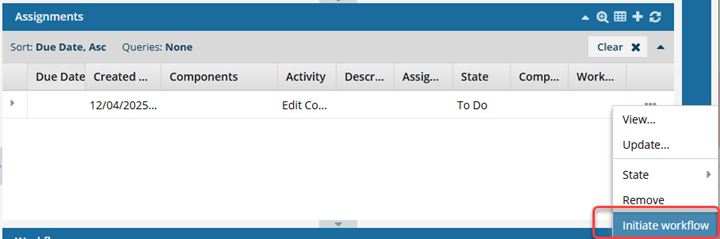
 If the Initiate workflow option is unavailable, the assignment is already in use by another workflow.
 -
On the Complete Assignment screen, click Yes.
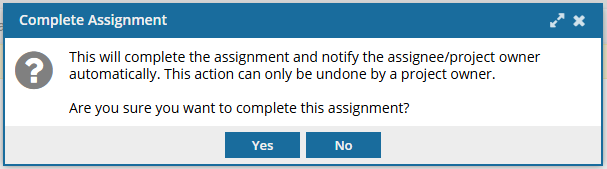 Results:
- Inspire marks the assignment as Completed. Even if you cancel out of starting a workflow, the assignment will remain marked as Completed.
- Inspire notifies the user who was assigned to this work and the project Owner that the assignment was Completed.
- Inspire opens the Start a workflow screen.
-
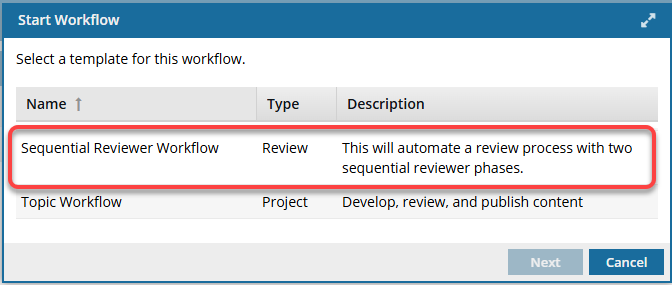
On the Start Workflow screen:
-
Click Next.
Results: The Create Review screen opens.
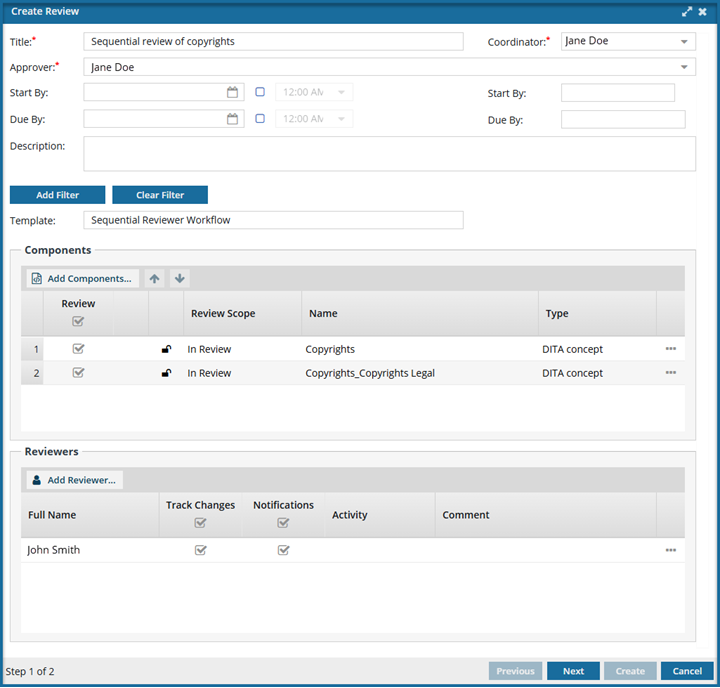 Notice that in the bottom-left corner of the screen, this screen is Step 1 of 2.
-
Click Next.
-
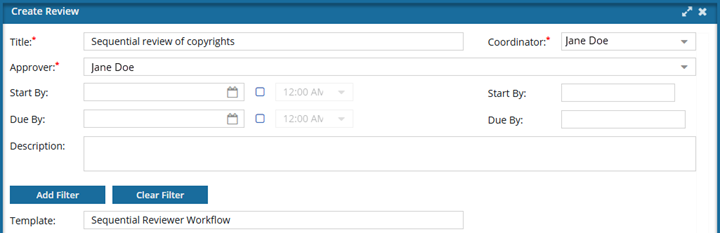
On the Create Review screen, in the top section:
 Previously, a review coordinator could set an option to restrict discussions during the Resolving phase. Although this setting no longer appears, all reviews work as if this option were selected. No new discussions can be saved by any type of user when the review is in the State of Resolving.
- The Create button is active in both the Component Discussions and the Discussions panes.
- You can enter text on the Create Discussion screen, but after you select Create, you see a warning that "Discussions can only be created during the review phase."
- Only the review coordinator or administrator can edit or delete messages in the Component Discussions and Discussions (for the entire review) panes when the review is in the Resolving state.
- If the review is not in a State of Resolving, reviewers can add, edit, and delete their own comments in the Collaboration panel until all users have completed their review or the review is canceled.
-
Optionally, in Start By, you can set the date you want work to start on if you don't want the workflow started immediately after you create the workflow.
Optionally, you can also set a time. Select the blue checkbox and then select a time from the dropdown list.

-
Optionally you can set a deadline in Due By. You can do one of the following:
- Add more time by extending the due date out
- Add a new due date if there is no default
- Leave this value blank
Optionally you can also set a time. Select the blue checkbox and then select a time from the dropdown list. -
Make sure the workflow template you want to use is listed in Template.
If you need to change the template, you must click Cancel and start over.
-
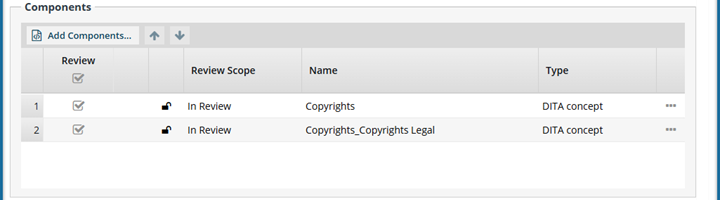
On the Create Review screen, in the Components section:
-
On the Select Project Components screen:
i. Select the checkbox for the project components you want to include in the review.
ii. To find components, use the search query.
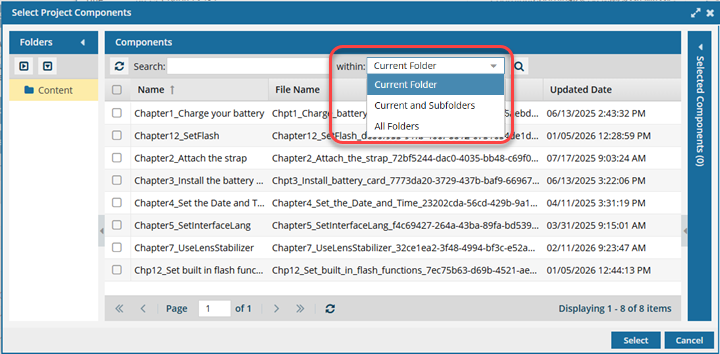 Search tips:
- In Search, enter text that is used in the name of the component.
- By default, the search is limited to the current folder. To expand the search, in Within, select Current and Subfolders, or All folders
- To see search results, click the magnifying glass
 . You see component results. If there are more than 25 records, scroll to additional pages to see more results.
iii. Click Select.
Result: The Select Project Components screen closes, and you are returned to the Create Review screen. -
Optionally, to re-order the topics, select one, drag it to a new place in the list, and then drop it. You can also reorder the list by selecting a component and using the
 Up and
  Down arrows to move it.
-
Optionally, to remove a component, select the Options menu and then select Remove.
-
Optionally, you can open the component to make sure it's the one you want. Select the Options menu and then Go To. This option opens the Components browser (if not already opened) and selects the component.
If you add unlocked components to a review, and the components have one or more attachments:
If the attachment is a binary component, it is added as one of the following:
If the binary is unlocked, it is added as In Review
If the binary is locked, it is added as Context Only
If the attachment is not a binary, and it is unlocked, it is added as In Review
-
On the Select Project Components screen:
-
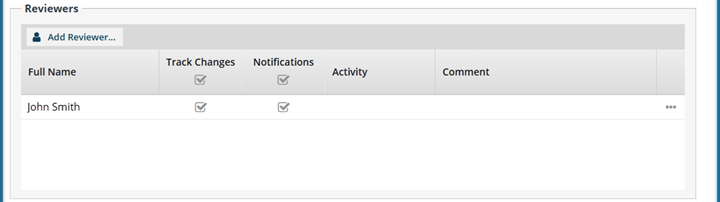
On the Create Review screen, in the Reviewers section:
-
Click Add Reviewer.
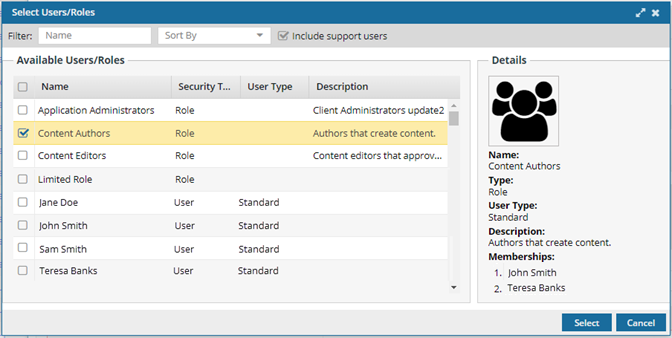
Result: You see the Select Users/Roles screen.
-
To add an individual User, in the Available Users/Roles list, select the checkbox next to their name.
 Tips and tricks: If the list is large, or you only want to see a certain type of role or user, you can narrow the list in the following ways:
- To see only names that contain a word or specific letters, in Filter, enter text. For example, you can find names that contain "admin" or "review". You can't search for text in any other column except Name.
- To see all users and roles but sorted by Name, Security Type, or User Type, click the column heading and then click the gray arrow.
- To see all roles listed first, sort the list by Security Type in ascending order. Click the Security Type column heading, click the gray arrow, and then select
 Sort Ascending.
 - To see all users listed first, sort the list by Security Type in descending order. Click the Security Type column heading, click the gray arrow, and then select
 Sort Descending.
 - To sort by Name or User Type, you can also use the Sort By dropdown box.
- By default, names with a User Type of Support are not included in the list. To see these users, select the Include support users option
-
To add all members of a Role at once without having to select all the individual user checkboxes, select a Role.
Tips:
- To see the list of users you will be adding, go to the Details pane and look in Memberships.
- If necessary, you can remove individual users after you click Select.
-
When you are done choosing users and roles, click Select.
Results:
- You are returned to the Create Review screen.
- The selected users appear in the Reviewers list.
- If you selected a Role, the members are listed individually in the Reviewers list.
- To remove a user, in the user's row, select the Options menu, and then select Remove
-
By default, all reviewers have Comment Only permission. To change reviewer permissions to Comment and Track Changes, do one of the following:
An administrator can remove the ability for all reviewers to edit content and track changes.
- If an administrator sets the ReviewCommentOnly feature to false, you can select or clear the Track Changes option.
- If an administrator sets the ReviewCommentOnly feature to true, you can only create a review with comments in the Create Review and Update Review screens. The Track Changes option does not display.
By default, this feature is set to false. Coordinators can select or clear the Track Changes option. Administrators can read about how to manage this feature in Limit reviews to comments only.
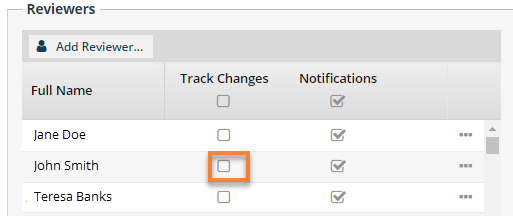
- To grant editing permissions to a user, in the Reviewers list, go to user's the row and select Track Changes.
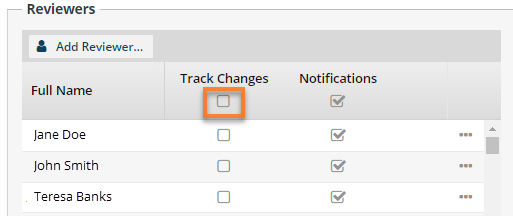
- To grant editing permissions to all users in the Reviewers list, go to the row that shows the list's heading. Select Track Changes.
-
Click Add Reviewer.
-
On the second Create Review screen:
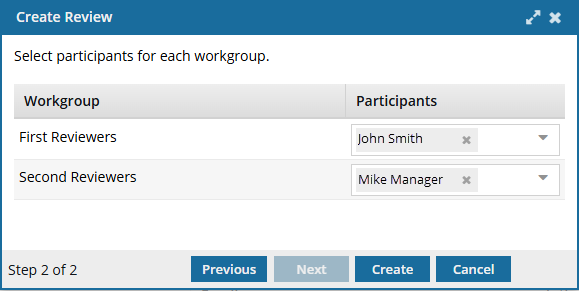 Notice in the bottom left corner of the screen that this screen is Step 2 of 2
- In First Reviewers, go to the Participants list and select the user whom you want to complete a review before any other user sees it.
- In Second Reviewers, go to the Participants list and select the user who you want to be the last to complete a review. This user can see the first reviewer's comments.
-
On the second Create Review screen, click Create.
Results:
- Your workflow is created.
- The Review is created in the Reviews module.
If you try to assign work to a participant who doesn't have access to the component, you will see the following error. This workflow has one or more permission problems. It is recommended to cancel the workflow, correct the permissions, and then restart it. The assigned user "Jane.Doe@MyCompany.com" does not have permission to access the following components: PrivateConcept.
- The error tells you the name of a user included in the workflow. It may not be the user who needs the permissions, so you have to check each participant's permissions to the restricted component.
- The warning tells you the name of the restricted component.
- The Workflow is still started. You can change the permission, participant, or the component to resolve the conflict.
- For details on how to set permissions, refer to: Set permissions.