Compare map snapshots
Snapshots are records of data you have saved at different intervals so that you can recover information from different versions. For example, you may want a snapshot of a map when you create, move, and update the map. You can compare the history for two snapshots in a PDF file to see the differences.
 Tips and tricks
Different component types use different methods
For most component types, you can compare two different versions in a viewer. For a binary, workflow, or map component, you can't use the viewer, but you can compare them in the following ways:
- Publish two existing snapshots in a PDF.
- Take an On Demand snapshot of the current version, and then publish it and an historical snapshot in a PDF.

Compare snapshots for other component types
For component types that aren't map, binary, or workflow, you can use a component's snapshot history to select two versions and display the differences between them in a viewer. Follow the steps in Compare component snapshots.
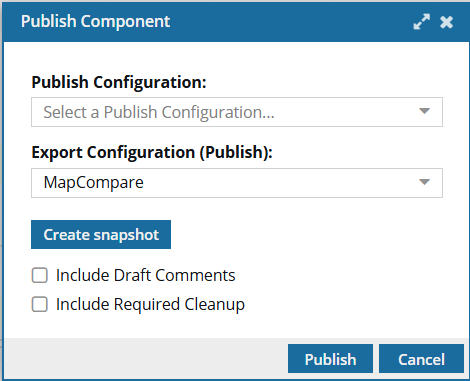
 When comparing maps, the Publish Name field is not shown on the Publish Component screen. The publishing job name follows the format: Publish-{ComponentName}-{DateTime}.zip.
To compare map snapshots:
-
Click
 Components.
-
In the Components pane, right-click the component and then select Details...
 You can access the same menu by clicking
  the Options menu.
 -
Optionally, on the Publish Component screen, in Publish Configuration, select the publish settings you want to see.
This configuration is created by an administrator and includes settings such identifying the export process to use, validating XML, and using profiling attribute filters. An administrator can choose a Publish Configuration to be shown automatically as the default. If you need to use something other than the default, you can select another option. The same settings on the Publish Component screen can also be set by an administrator in the Publish Configuration.
- If you select options on the Publish Component screen, your settings are used even if they are in conflict with the Publish Configuration that an admin creates.
- If you select options on the Publish Component screen that don't conflict with the Publish Configuration that an admin creates, then both sets of options are used.
 For some customers, Inspire provides a publishing configuration and a publishing plug-in for DOCX. If it's supported for your organization, you can select the Publish Docx option.
 -
On the Publish Component screen, in Export Configuration (Publish), select Compare as the format you want the output to be in. Do not select PDF or HTML, for example.
Your configuration choice is used to create the output, even if it is in conflict with the Export Configuration (Publish) set in the Publish Configuration by an administrator.
-
By default, Draft Comment elements are not included in the map comparison. If you want to see the content between the
<draft-comment>tags in the comparison, select Include Draft Comments. This option is only available when publishing a map comparison. -
By default, Required Cleanup elements are not included in the map comparison. If you want to see the content between the
<required-cleanup>tags in the comparison, select Include Required Cleanup. This option is only available when publishing a map comparison. -
Select Publish.
 Results:
 - You'll receive a notification to download a PDF when the comparison is complete.
- The differences appear in colored text:
- Green text for an addition
- Red text with a strikethrough for a deletion
- Yellow for attribute changes
To close the Component Details screen, click Cancel.